Posting to the Storage broker
Learn how to effectively interact with the Storage Broker API. This guide covers creating and updating data, search queries, payload structure, and notification handling.
Posting to the Storage Broker
This guide explains the process of making a broker call, detailing the structure and components involved. It covers the dispatch, payload, and different operations available when interacting with a broker, as well as the flow of data persistence and processing.
In this guide, you’ll find:
- Clear instructions on making calls to the Storage Broker.
- Details on dispatch structure, payload design, and operations.
- Insights into data persistence, processing stages, and notification workflows.
Posting to the Storage Broker
How to make a call?
Each broker call follows a consistent structure. Every call includes:
- Dispatch: Instructions detailing where data goes and what operation to perform.
- Payload: The actual data being created, updated, searched, or read.
Dispatch
The dispatch has two core elements: Entity and Operation.
Entity: Where Do I Want My Data to Go?
The entity directs data to a specific table, index, or topic based on your configuration. For example:
- Entity:
merchant_account - Operation:
Search
This would locate the associated Elasticsearch index formerchant_account.
Operation: What Am I Doing With This Data?
Operations define the action performed on the data. Supported operations include:
- Create, Read, Search: Primary operations for interacting with data.
- Update, Delete: Similar to
Create, differing in the payload sent.
Payload
The payload represents the data to be processed. It varies depending on the operation:
- Read: Queries built using RQL query language.
- Search: Elasticsearch queries using Query DSL.
- Create/Update/Delete: JSON-formatted payloads for Kafka.
Example Broker Call
POST https://pps-storage-api-broker:80
{
"dispatch": {
"entity": "merchant_account",
"operation": "read"
},
"payload": "eq(id,2933752)"
}
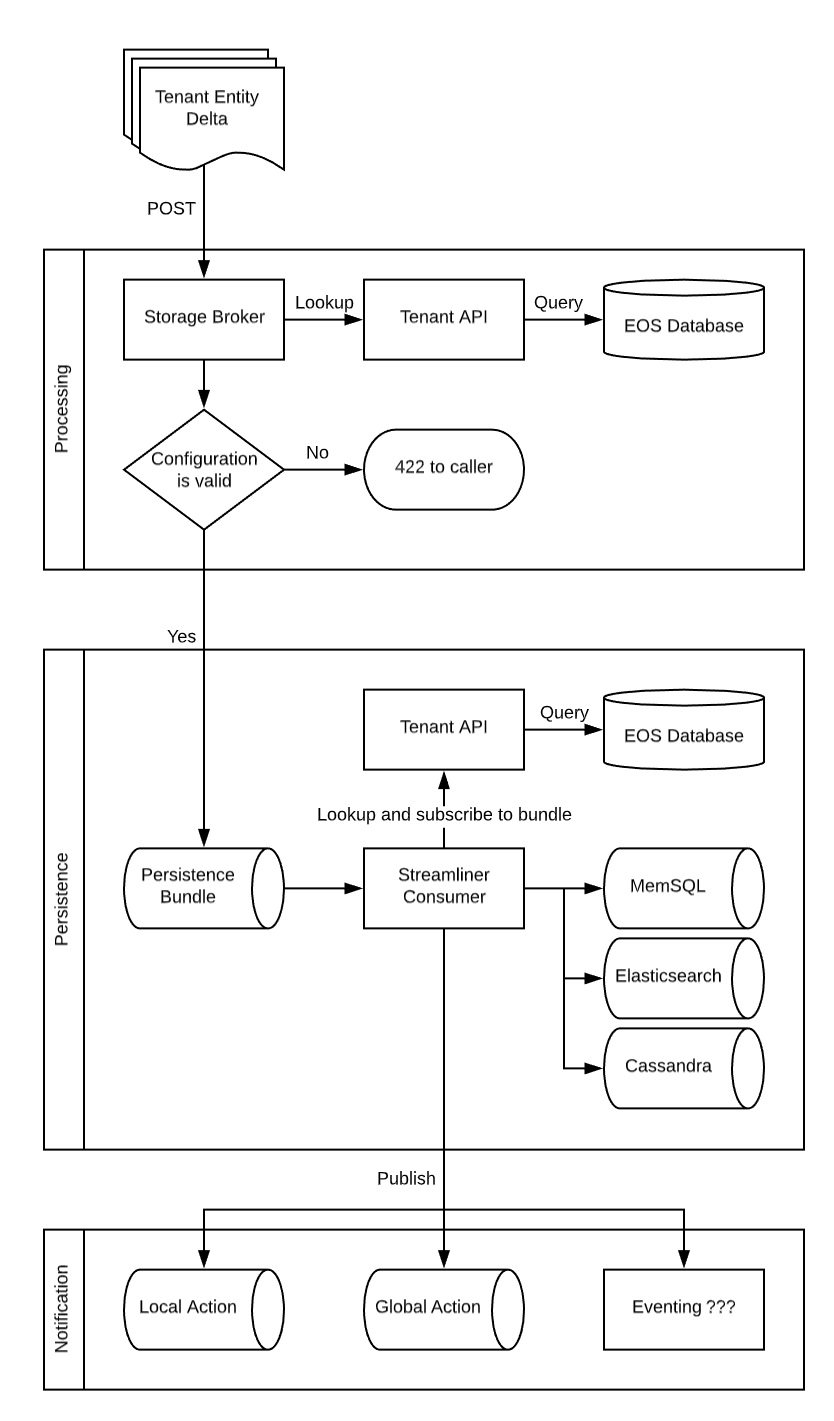
Data Persistence Flow
The following flow illustrates data persistence through the broker:
Processing
When delta envelopes are sent to the storage broker, they undergo several validations and transformations:
- Look up the entity configuration from the tenant API.
- Perform validation and ensure the tenant has a matching entity key.
- Identify the appropriate persistence topic for the entity.
- Verify user/role permissions.
- Apply restrictions to the delta payload based on permissions.
- Encrypt sensitive or critical data.
Notification
After persistence, the broker handles notifications. If no methods are configured for the entity, this step is skipped. Notifications include:
- Global Action Topics: Messages sent after persistence, regardless of origin.
- Local Action Topics: Messages originating from the same data center.
Action Topics
Action topics are optional and unique to an entity. They allow tenants to receive updates about data changes. Two types of topics exist:
- Global Action Topics: Receive all messages after persistence.
- Local Action Topics: Limited to messages originating from the same data center.
Updated 7 months ago